

Baby tracking
How to track baby feeding, sleep, and diapers without making it a second job
Quick answer
Track only what helps you answer the next care question: when the baby last ate, when the last diaper change happened, and when sleep started or ended. Add amounts, durations, and notes only when they will be useful. Consistency matters more than a perfect diary.
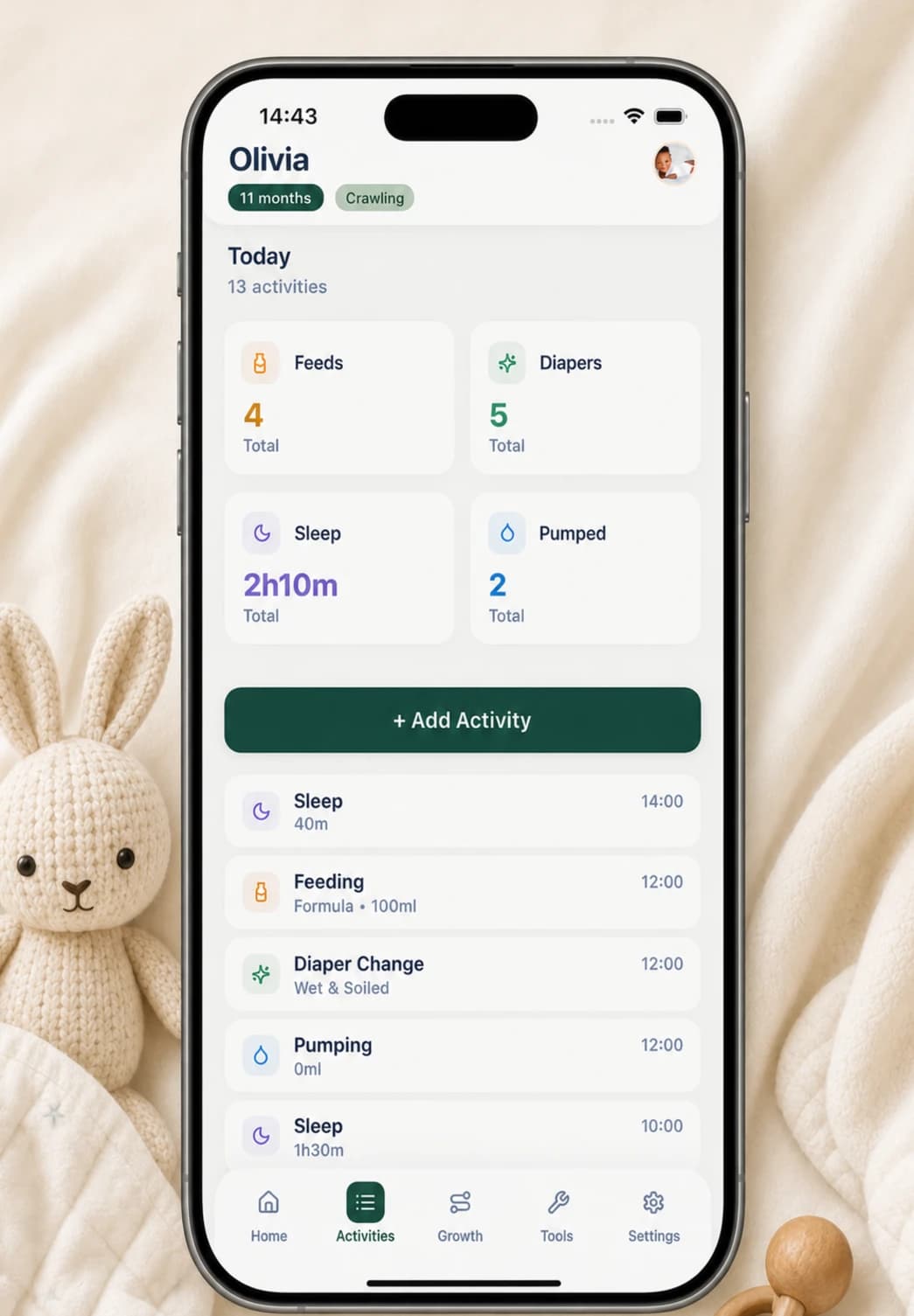
Use a three-activity minimum
Begin with feeding, diapers, and sleep rather than enabling every possible category. For each event, save the time first. That alone can answer the most common handoff question: what happened most recently?
Add one level of detail when it changes what you will do with the record. A bottle amount may help reconstruct a day, wet and soiled flags distinguish diaper entries, and a sleep duration can make a timeline easier to scan. Notes should capture exceptions, not repeat everything the structured fields already say.
- Feeding: start time and bottle or breast; add amount or side duration when useful
- Diaper: change time and wet, soiled, or both
- Sleep: start time and duration
- Optional context: one short note for an unusual or important detail
A quick Buggy routine
Create a baby profile on the iPhone without a Buggy account. On Home, today’s activity cards double as quick-add buttons: tap Feedings, Diapers, or Sleep, complete the small form, and save. Buggy writes the entry to the local baby record and returns it to the timeline and today’s totals.
For feeds, choose bottle or breast and record the relevant amount or side durations. For diapers, mark wet, soiled, or both. For sleep, choose the start time and duration. Every form accepts an optional note, but leaving it empty is a valid way to keep logging fast.
- Tap the matching activity card
- Confirm the time
- Add only the detail you expect to use
- Save and return to care
- Check the Home card when you need the latest event or today’s total
Handle missed and incorrect entries without chasing perfection
If you miss an entry, continue with the next event. Do not invent an exact time or amount just to make the day look complete. When you genuinely remember the event, Buggy’s activity form lets you choose an earlier date and set the relevant start or change time.
Open Activities when a saved detail is wrong. You can edit the activity or delete it rather than layering a correction into a note. A transparent gap is more useful than false precision, especially if the record is later shown to another caregiver or clinician.
- Log retroactively only when you can provide a useful detail
- Edit the original entry when the time, amount, duration, or type is wrong
- Delete accidental duplicates
- Leave uncertain gaps uncertain
Review the record at the level you need
Buggy’s Home screen gives the immediate view: today’s feeding and diaper counts, total recorded sleep, and how long it has been since the latest activity. The Activities timeline provides the underlying entries when you need to inspect or correct a specific event.
For a deliberate handoff, Settings can generate a PDF report with 7- and 30-day summaries of feed counts, recorded bottle volume, diaper counts, sleep totals and sessions, plus recent growth measurements. A CSV export creates a separate activity file. These are records of what was entered, not clinical interpretation.
- Home: answer what happened most recently
- Activities: inspect the sequence and edit individual entries
- PDF: share a compact multi-day summary
- CSV: keep or transfer a separate activity file
Keep care guidance outside the tracker
A timeline can support memory, but it cannot determine whether a feeding, diaper, or sleep pattern is healthy for a particular baby. For feeding, observe hunger and fullness cues rather than using the log as a target. Contact a qualified clinician if you are concerned about feeding, growth, hydration, illness, or a sudden change.
Sleep duration tracking is also separate from sleep safety. Follow current safe-sleep guidance for every nap and night; a recorded start time or duration says nothing about whether the sleep environment is safe. The NIH Safe to Sleep campaign provides evidence-based guidance for reducing sleep-related risks.
- Use the record to remember and describe—not diagnose
- Use feeding cues and individualized professional guidance ahead of app totals
- Follow current safe-sleep guidance independently of the sleep log
- Seek professional or emergency help when a concern is urgent
Choose the privacy and sharing model deliberately
Buggy stores baby profiles, activities, growth measurements, notes, custom activities, preferences, and selected photos on the device. It does not require a Buggy account or upload that baby record to a Buggy cloud database. Purchases, restores, and some access checks are separate and may require internet.
The corresponding limitation is no live cross-device sync. If two caregivers need a continuously shared timeline on separate phones, an account-based tracker may fit better. If one local record and deliberate handoffs are enough, protect the phone, review its backup settings, and remember that an exported copy is controlled by its destination after it leaves Buggy.
- No Buggy account is required for the baby record
- Routine care data is device-local rather than stored in a Buggy cloud database
- A second phone does not receive automatic Buggy timeline updates
- Backups and exported files need their own privacy and retention decisions
Questions, answered plainly
How often should I log feeding, sleep, and diapers?
Log the events you expect to use for memory, handoffs, or a conversation. There is no benefit in making the record more detailed than your purpose requires. If tracking becomes burdensome, reduce the fields or categories.
What should I do when I forget an entry?
Continue with the next event. Add the missed activity later only when you remember enough to make it useful, and avoid guessing an exact time or amount merely to fill a gap.
Can I show a Buggy log to a pediatrician?
Yes, as a record of the details you entered. The recent timeline, CSV export, or PDF summary may help you describe what happened, but they are not a diagnosis or professionally reviewed medical report.
Does Buggy sync feeding, sleep, and diaper entries between phones?
No. Buggy keeps the baby record on the device and does not provide live cross-device sync. Caregivers can use an in-person update or a deliberately shared export instead.
Sources and further reading
- Signs your child is hungry or fullCenters for Disease Control and Prevention
- Ways to reduce baby’s riskNICHD Safe to Sleep
- Buggy privacy policyBuggy