

Baby tracking
How to share a baby routine with a caregiver without overcomplicating it
Quick answer
A useful caregiver handoff answers four things quickly: what happened most recently, what is likely to happen next, which health and safety instructions are non-negotiable, and how to reach the parent. Share one current record, not a long history the caregiver has to interpret.
Use a 60-second handoff
Start with recent facts: the last feed, sleep, and diaper change, plus anything unusual about today. Then state the next expected task and the best way to contact you. This gives the caregiver an operational picture without asking them to interpret a full tracking history.
Keep health instructions in a separate, clearly labeled part of the handoff. Include current allergy, medication, clinician, and emergency information only when it is accurate and relevant, and use the exact written plan provided for the child rather than turning app data into advice.
- Last feed: time and the relevant feeding detail.
- Last sleep: when it started, its duration, and when baby woke.
- Last diaper: time and the detail your family records.
- Today only: one short note about anything different.
- Next step and contact: what is expected and who to call with a question.
Separate facts, preferences, and professional instructions
A timestamped activity is a fact. A preferred routine is a family preference. A feeding, medication, or safety plan from a qualified professional is an instruction. Labeling those categories prevents a caregiver from mistaking a recent pattern for a rule or an app summary for medical guidance.
Avoid writing an idealized schedule when today's reality is different. If the baby ate or slept at an unusual time, hand off the current fact first and explain the normal preference second.
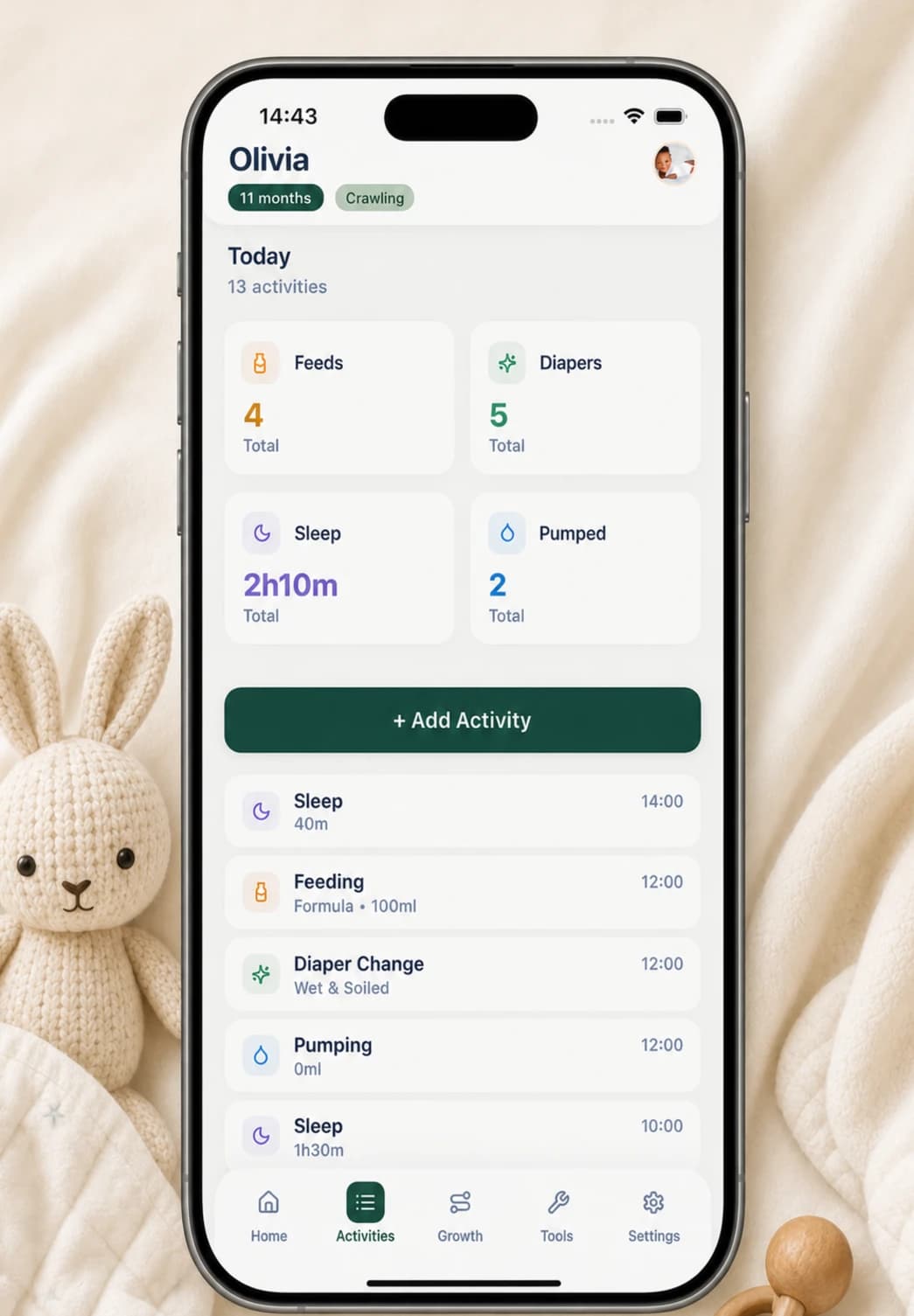
Use Buggy for the recent record on one phone
Buggy's Home screen shows today's recorded feeding count, diaper count, sleep total, and the time since the latest entry in each category. Tapping a card opens the corresponding form, so a caregiver holding the same phone can add the next activity with its time and an optional note.
The activity history is the place to check or correct individual entries. Agree in advance on simple definitions—such as what counts as the start of sleep and which diaper details matter—so two caregivers do not record the same event in incompatible ways.
- Before leaving, review the latest Home-screen times together.
- If the same phone stays with the caregiver, show them how to add and correct an entry.
- Use notes for exceptions, not repeated instructions that belong in the handoff plan.
- At return, review new entries and clarify anything uncertain while it is still easy to remember.
Be explicit about the no-sync tradeoff
Buggy stores baby activity on the device and does not provide live cloud sync between two caregiver phones. That keeps the day-to-day record out of a Buggy account, but it also means another caregiver will not automatically see a new entry on their own device.
For a separate-phone handoff, Buggy can export a CSV containing activity rows or a PDF containing seven-day and 30-day summaries. The PDF is useful for a broad review; the CSV is more detailed. Neither is live, so send a fresh handoff only when needed and do not present an older file as the current record.
Make safe sleep consistent across every caregiver
A routine handoff should never imply that a tracker makes sleep safe. CDC and American Academy of Pediatrics guidance says infants should be placed on their back for every sleep, use a firm, flat, non-inclined sleep surface intended for infants, and have soft objects and loose bedding kept out of the sleep area.
Review the actual sleep space and those basics with anyone providing care. Add any child-specific instructions from the baby's qualified clinician. Buggy cannot assess the environment, monitor breathing, or prevent harm, so health and safety questions belong with an appropriate professional rather than inferences from the log.
Questions, answered plainly
Can two caregivers use Buggy on separate phones at the same time?
Buggy does not currently provide live cloud sync between caregiver devices. Caregivers can use the same phone, or one person can share a current PDF summary, CSV export, or short manual handoff with the other.
What does another caregiver actually need to know?
Start with the most recent feed, sleep, and diaper change; anything unusual today; the next expected task; essential written health or safety instructions; and how to reach the parent. Share more history only when it has a clear purpose.
Can a caregiver add activities to Buggy?
Yes, if the caregiver has the same phone and access to the app. They can tap the activity cards to add entries and use the history to review them. Entries made in a separate Buggy installation will not sync back automatically.
Should a caregiver use the tracker for health or safety decisions?
No. Buggy records information but does not provide child-specific medical instructions, monitor a baby, or assess a sleep environment. Give caregivers current written instructions and professional contact information, and use qualified medical help for concerns.
Sources and further reading
- Sleep-Related Infant Deaths: Updated 2022 Recommendations for Reducing Infant Deaths in the Sleep EnvironmentAmerican Academy of Pediatrics
- Providing Care for Babies to Sleep SafelyCenters for Disease Control and Prevention